This is the bvlogythingy...I hope you like it!
A sign-up page before I build the public version
This is the longer version of a post I put on LinkedIn today. My last few entries were about how Agentic_JobSearch4me is working for my own search. This one is about finding out if it could work for other people. I'm calling the public version GoReachAgentic, and today I put up a one page sign-up at goreachagentic.com to see who is interested.
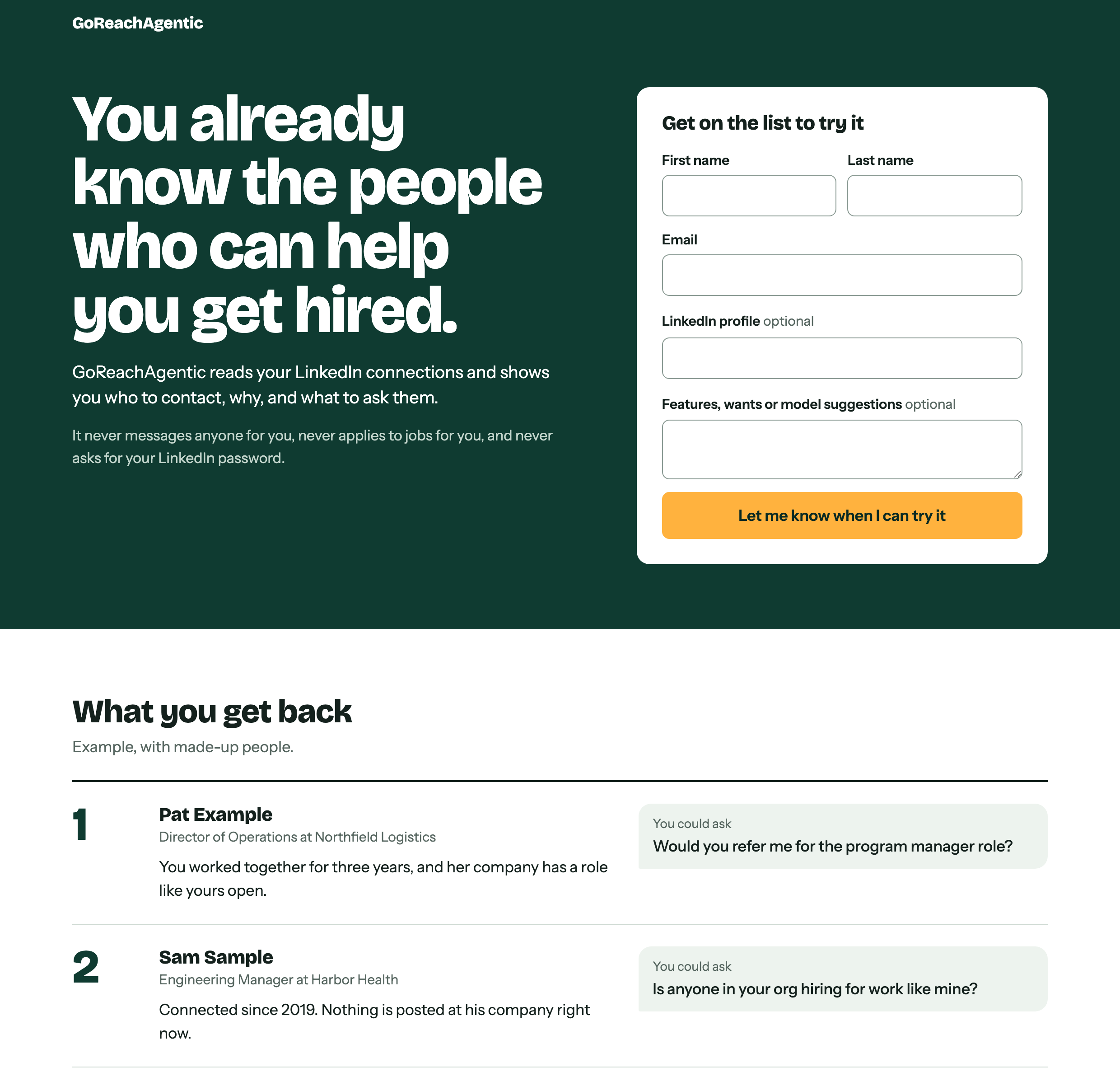
Why it starts with outreach
The tool I use every day does two things. It finds and scores job listings and builds applications, and it tells me who in my network to contact. I'm starting the public version with the second part, because the conversations that went somewhere in my search all started with a person I already knew. When I counted on October 2, five people had referred me for six roles since the rebuild, and none of those came from a cold application.
The outreach side is also the smaller thing to build for someone else. It needs one file from LinkedIn and a resume. The application side needs a lot more access, like email, and that can wait until I know people want the first part.
What it does
It takes the connections file LinkedIn lets you download and ranks every person in it. For each person it gives a reason they are on the list and something you could ask them, and it drafts a short note when you ask for one. You send the note yourself. It doesn't message anyone for you, it doesn't apply to jobs for you, and it never asks for your LinkedIn password.
It looks at the whole network, including people at companies with nothing posted right now. Those people can still tell you who is hiring in their org. That goes back to something I wrote about in July, which was to rank everyone and not hide anyone.
How the page came together
The page took two tries, and the second one happened this morning.
- The first page was a mess. The first version went together on Sunday. It had the form in two places, and it asked how you heard about it, whether you were looking for work and what you would pay. This morning I had Claude throw it out and start over.
- One form, shown once. The new page asks for a first name, a last name and an email. A LinkedIn profile and a box for features you would want are both optional. The page keeps track of which link you came from, so it doesn't need to ask how you heard about it.
- Two clicks is too much to ask. We also tried a version with an intro page that led to the form on a second page. I dropped it, because I didn't want anyone to have to click twice to sign up.
- The first deploy was a 404. The first time the page went up, it published the wrong folder and the address came back "page not found". One config file fixed it.
- Every person on the page is made up. The example list shows Pat Example, Sam Sample and Lee Placeholder. I'm not putting my real connections on a public page.
What happens next
The version for other people is not built yet. The page is up for one week first, and I will read the sign-ups on October 13. The mark I set is 15 sign-ups from people outside my own connections.
If you are in a search, or you know someone who is, you can sign up here. There is a box on the form for features you would want. Please tell me what would make it useful for you! And if you are hiring a technical program manager, please let me know :)
A week of using only the board
This is the longer version of a post I put on LinkedIn. The post covers the week of September 28 to October 2. Here I wanted to go further into what happened with the board, and to put this week next to the five before it.
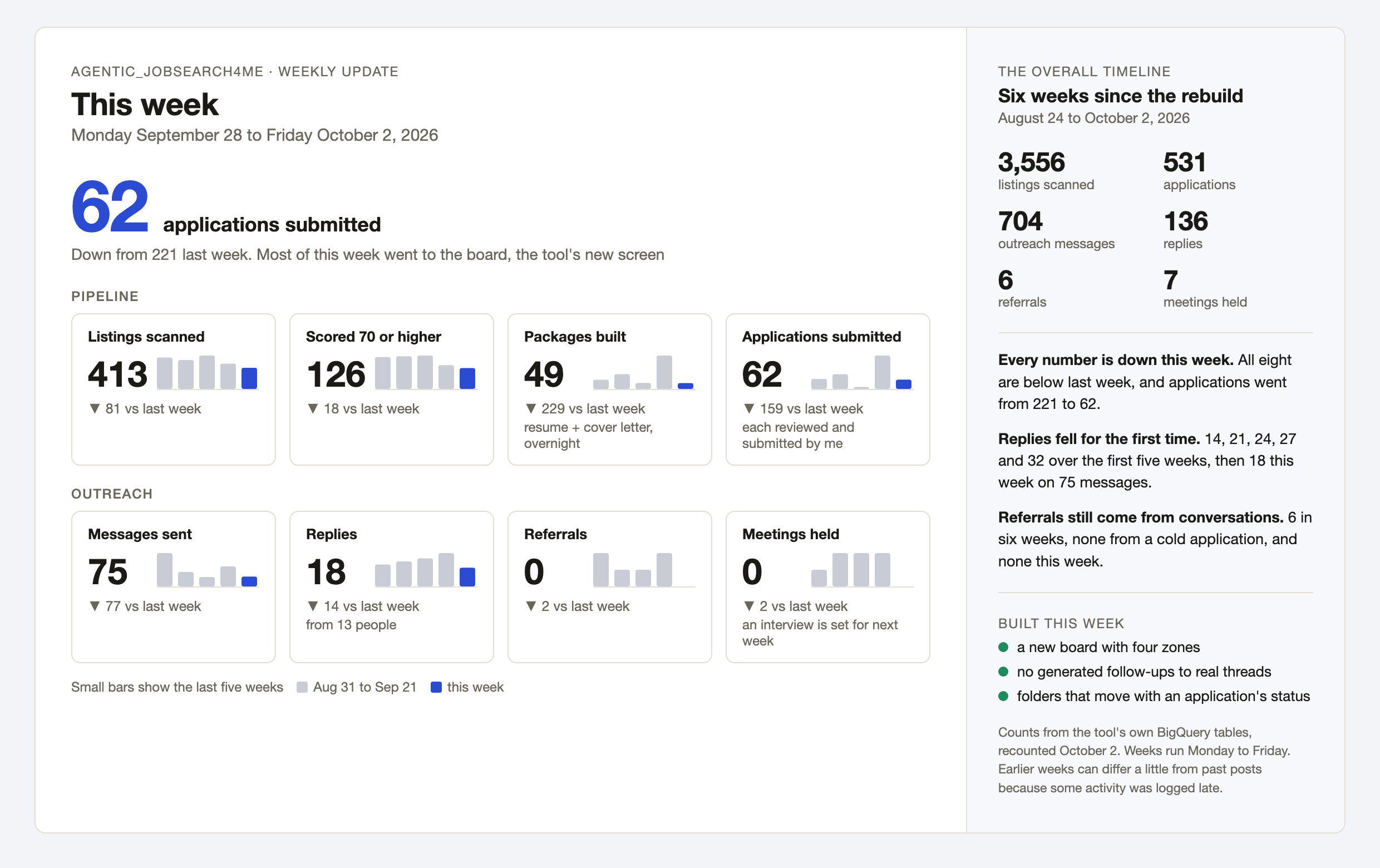
Last week I said this week would be about getting the most out of the network lane. It turned into something else. Until now I have run Agentic_JobSearch4me by typing to Claude in a terminal, and the plan from the beginning was for a screen to replace that. This week I tried to make that screen, which I call the board, the only way I use the tool. That took most of the week, and every number in the image below is lower than last week.
What the board is
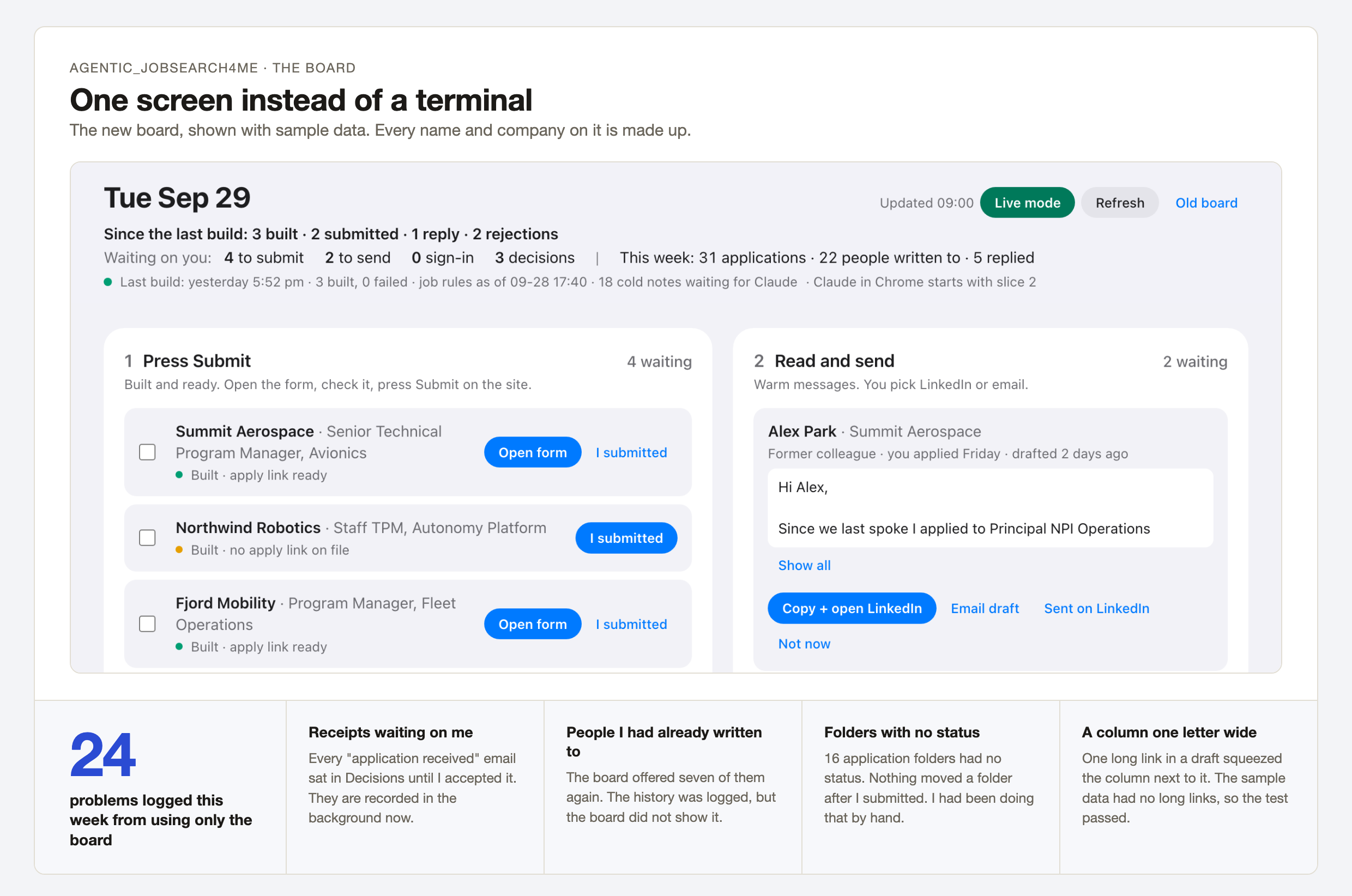
The board is a window on my Mac that shows what the tool did overnight and the few things that need me. On Monday I opened the version I had and told Claude the whole UI was broken. Before rebuilding it, Claude went back through how I had actually used the tool over the past weeks, and we planned the new screen from that. It has four zones. I press Submit on applications the tool has already filled in. I read and send notes to people I know. I sign in when a site asks for it. And I decide the cases the tool held back because it was not sure. Everything else is supposed to happen without me.
What using only the board turned up
Using only the board showed me how much Claude had been doing by hand in those terminal sessions. I logged 24 problems over the week. These are the ones that taught me the most.
- Folders with no status. After I submitted an application, nothing moved its folder. That had always been a step Claude did by hand in a session, and on Wednesday it was skipped. By Thursday 16 folders had no status. Now a folder follows the status of its application, and that rule lives in one place in the code.
- People I had already written to. On Thursday the board offered me notes to seven people I had already contacted. The history was logged, but the board did not show it, so a follow-up looked like a first note. The follow-ups were also built from a template, and six of them named an application that had already been rejected. The tool no longer writes a follow-up on its own to anyone I have a real conversation with. When we replayed the old drafts against the new rule, it refused all 21 of them.
- Receipts waiting on me. Every "application received" email showed up as a decision for me to accept. Those are recorded in the background now.
- A column one letter wide. One long link in a draft squeezed the column next to it until the text ran one character per line. The sample data we tested with had no long links, so the test passed and the real board did not.
Seventeen of the 24 are fixed. The board still does not show the history next to each note, and six problems from the old board are still on the list. My first plan for the follow-up problem also went through the skeptic committee, which turned it down and sent it back in a different order.
Week over week
Here is every number from the first image, week by week since the rebuild. Each week runs Monday to Friday and is labeled by its Monday, so 9/28 is this week. The highlighted bar is this week, and the line under each number is the change from the week before.
Pipeline
Listings scanned
413 ▼ 81 vs last week
Scored 70 or higher
126 ▼ 18 vs last week
Packages built
49 ▼ 229 vs last week
Applications submitted
62 ▼ 159 vs last week
Outreach
Messages sent
75 ▼ 77 vs last week
Replies
18 ▼ 14 vs last week
Referrals
0 ▼ 2 vs last week
Meetings held
0 ▼ 2 vs last week
Counted from the tool's own BigQuery tables and recounted on the afternoon of October 2. Earlier weeks can differ a little from what past posts said, because some activity was logged late. Last week's applications are 221 here and were 218 when I posted.
The trends so far
- TrendWeeks spent building are slow weeks. The two weeks with the fewest applications are September 14 (13) and this one (62), and they are also the two weeks with the fewest packages built (50 and 49). Both went to working on the tool.
- TrendReplies fell for the first time. They went 14, 21, 24, 27 and 32 over the first five weeks, then 18 this week. Messages sent went 42, 253, 110, 72, 152 and 75 over the same six weeks.
- TrendReferrals come from conversations. Five people have referred me for six roles since the rebuild, and none of those came from a cold application. This was the first week since the first one with no new referral.
- TrendFewer listings are coming in. Listings scanned went from 817 in the first week to 413 this week, and 126 roles scoring 70 or higher is the lowest week so far.
I do have an interview next week, which came out of the screening and take-home from September. Next week is about getting the volume back up, this time from the board. If you are hiring a technical program manager, or want to see how the board works, please let me know :)
The skeptic committee, and why I kept it
This is the longer version of a post I put on LinkedIn. It started with two videos from Mo Bitar on his channel Less Bitter, "Opus 5.5 is disturbing" and "I talked to 50 people building with AI. It's a mess." His advice to solo builders is to keep things simple. Fewer rules files, a fresh conversation for each task, work on main, and no big multi-agent setups. It got me thinking about how I use Claude, so I had Claude compare my setup against his list.
What I was doing well
- Running Opus at the highest effort setting, which matches his "no lower than Opus" advice.
- Adding most of my rules after something actually went wrong, each one dated to the incident.
- Starting each session from live data (calendar, Gmail, BigQuery) instead of notes an earlier session wrote.
What I was doing poorly
- One build session ran from September 3 to September 26 and was compacted 57 times.
- A feature branch had quietly become my real main, 108 commits ahead of it.
- A long handoff paragraph at the bottom of my rules file loaded into every session and kept going stale.
So I merged everything back to main and made working on main a rule. I cut my rules file from 165 lines to 110 and replaced the handoff paragraph with a single line. I also built a /wrap command that saves what matters at the end of a session, which makes starting a fresh conversation for each task easy.
The one thing I kept on purpose is my skeptic committee, and it is exactly the kind of multi-agent setup he says to drop. I kept it because LLMs lean positive. They tend to agree with you and tell you the plan is solid. This comparison is a good example. Claude's first answer said my setup mostly fit Mo's advice and I only needed to try two things. When I ran that answer through the committee, it found I was doing about 7 of the 10 things he says to stop. Mo says in the first video that "skepticism should be the default stance," and that is what the committee is for.
How it works
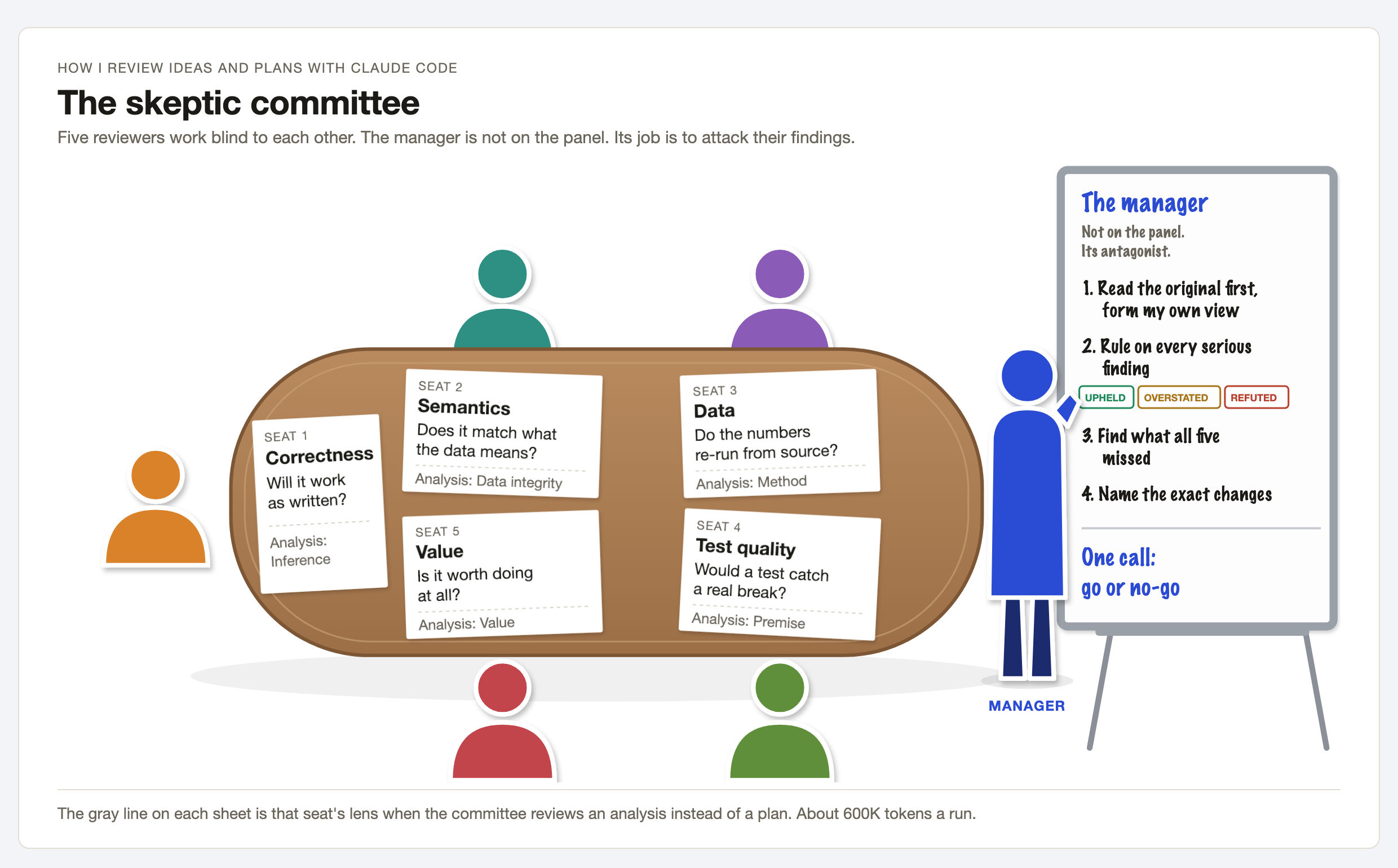
Five reviewers each read the plan or analysis on their own, at the same time, without seeing each other's work. Each one has a single lens. For a build plan that is correctness, meaning, data, test quality, and whether the work is worth doing at all. For an analysis it is inference, data integrity, method, premise, and value. Each reviewer is told that a manager will check their findings, so a made-up problem counts against them.
The manager is not part of the panel. It reads the original first and forms its own view before it looks at anything the reviewers said. Then it rules on every serious finding as upheld, overstated or refuted, and names the reviewer behind any false alarm. It looks for anything all five missed, writes out the exact changes to make, and makes one go or no-go call.
Why it is set up this way
A manager that just summarizes the panel ends up inheriting its mistakes. Reviewers have a bias of their own too, since they want to look useful, and sometimes one will raise a problem that isn't really there. A manager whose job is to challenge the panel catches both. The structure now lives in code, and the workflow will not run without five distinct seats, because Claude got it wrong twice in one day when the rules were only written down. A run costs around 600,000 tokens, so I save it for decisions that are hard to undo. Day to day, a single reviewer agent does the checking.
The code is public on GitHub if you want to look at it or try it yourself. If you are hiring a technical program manager, or want to talk through how the committee works, please let me know :)
Five weeks in, week over week
This is the longer version of a post I put on LinkedIn on Saturday. The post covers the week of September 21 to 25. Here I wanted to put that week next to the four before it, so the week over week changes and the trends are easier to see.
Last week I said this week would be back to volume, and it was. Agentic_JobSearch4me now builds a resume and cover letter package overnight for the roles that score 70 or higher, so each morning starts with a stack of roles ready for me to review. It built 278 packages this week and I submitted 218 applications, the most in any week since I rebuilt the tool in late August.
Volume showed me a limit I had not planned for. Some employers cap how many applications one person can send in a window, and a batch of twelve to one company ran straight into that. The tool already tracked a few of these caps. I am now adding a per-employer cap, so when a batch has several roles at the same company it picks the strongest one or two instead of all of them.
The bigger change is in outreach. The tool used to start with a company I had applied to and then look for someone who works there. As of Friday it starts with the people I already know. Each morning it picks people in my network I have not written to yet and drafts a short note to catch up, with no job link and no ask. I read every one and send them myself.
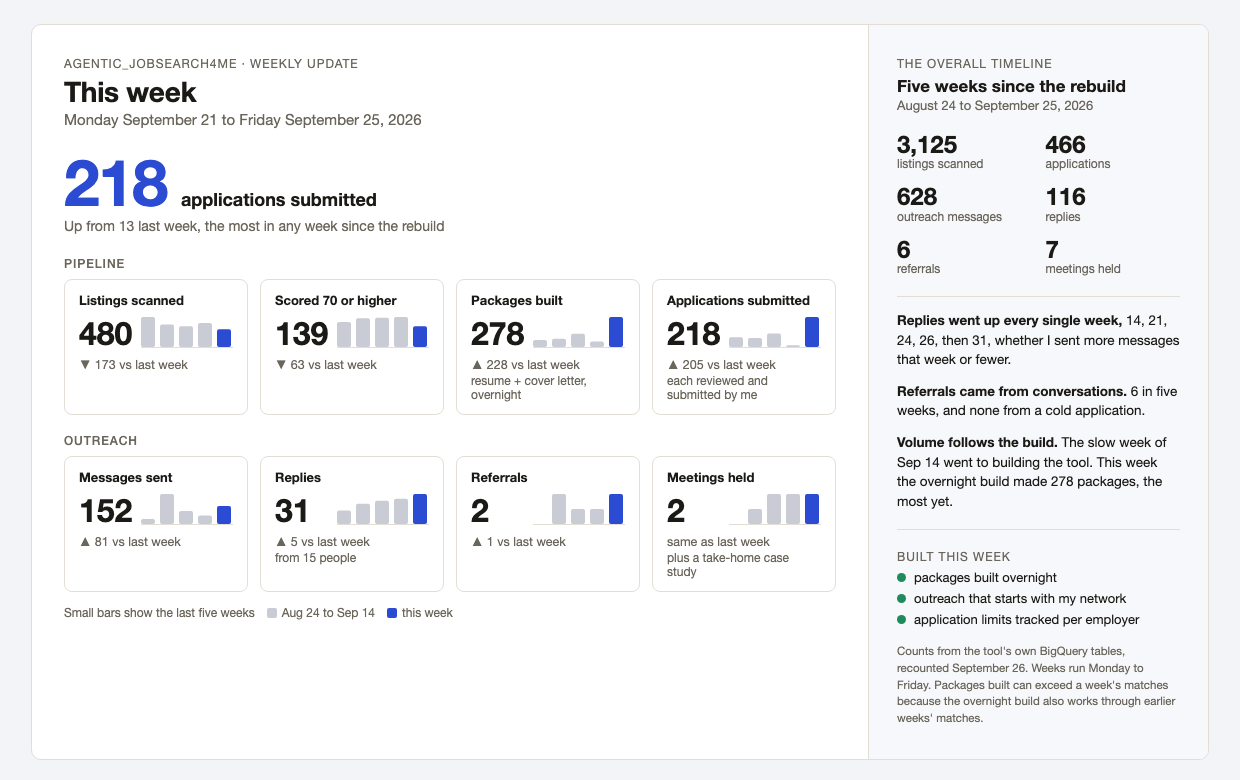
Week over week
Here is every number from that image, week by week since the rebuild. Each week runs Monday to Friday and is labeled by its Monday, so 9/21 is this week. The highlighted bar is this week, and the line under each number is the change from the week before.
Pipeline
Listings scanned
480 ▼ 173 vs last week
Scored 70 or higher
139 ▼ 63 vs last week
Packages built
278 ▲ 228 vs last week
Applications submitted
218 ▲ 205 vs last week
Outreach
Messages sent
152 ▲ 81 vs last week
Replies
31 ▲ 5 vs last week
Referrals
2 ▲ 1 vs last week
Meetings held
2 same as last week
Counted from the tool's own BigQuery tables and recounted on September 26. Earlier weeks can differ a little from what past posts said, because some activity was logged late.
The trends so far
- TrendReplies have gone up every week. 14, 21, 24, 26, then 31, whether I sent more messages that week or fewer. Messages sent went 42, 253, 110, 71, then 152 over the same five weeks.
- TrendApplications follow the build. The week of September 14 went to building the tool, and it had the fewest packages (50) and the fewest applications (13). This week the overnight build made 278 packages and I sent 218 applications, the most of both.
- TrendReferrals come from conversations. Five people have referred me for six roles since the rebuild, at least one in every week after the first, and none of them came from a cold application.
- TrendFewer listings are coming in. Listings scanned went down in three of the last four weeks, from 817 in the first week to 480 this week. Roles scoring 70 or higher held between 169 and 202 for four weeks and dropped to 139 this week.
Next week is about getting the most out of the network lane. If you are hiring a technical program manager, or want to see how the tool works, please let me know :)
Applying alone was never going to work
This is the long version of a post I put on LinkedIn the same day. The short version: the first job search tool I built was a smarter alert filter, it did not work, and the rebuild finally did.
The first version pulled the job alert emails out of Gmail, scored each listing, and showed me the ones that cleared a bar. It felt productive. When I finally sat down with the data in late July, two things were wrong with it. The intake was narrow, a couple of alert sources and a threshold, so I was seeing a thin slice of the market and applying to a thinner one. And the outreach side did not exist as a system at all. I had a spreadsheet of people I had messaged and no rule for who to contact next. When I audited a year of those messages in August, LinkedIn DMs got replies about 30 percent of the time and had produced zero meetings and zero referrals. Every meeting I had actually landed came from a direct email asking for a conversation. I was busy in the channel that did not work.
So I rebuilt it, working with Claude, into the three stages in the graphic below. Click it to see it full size.
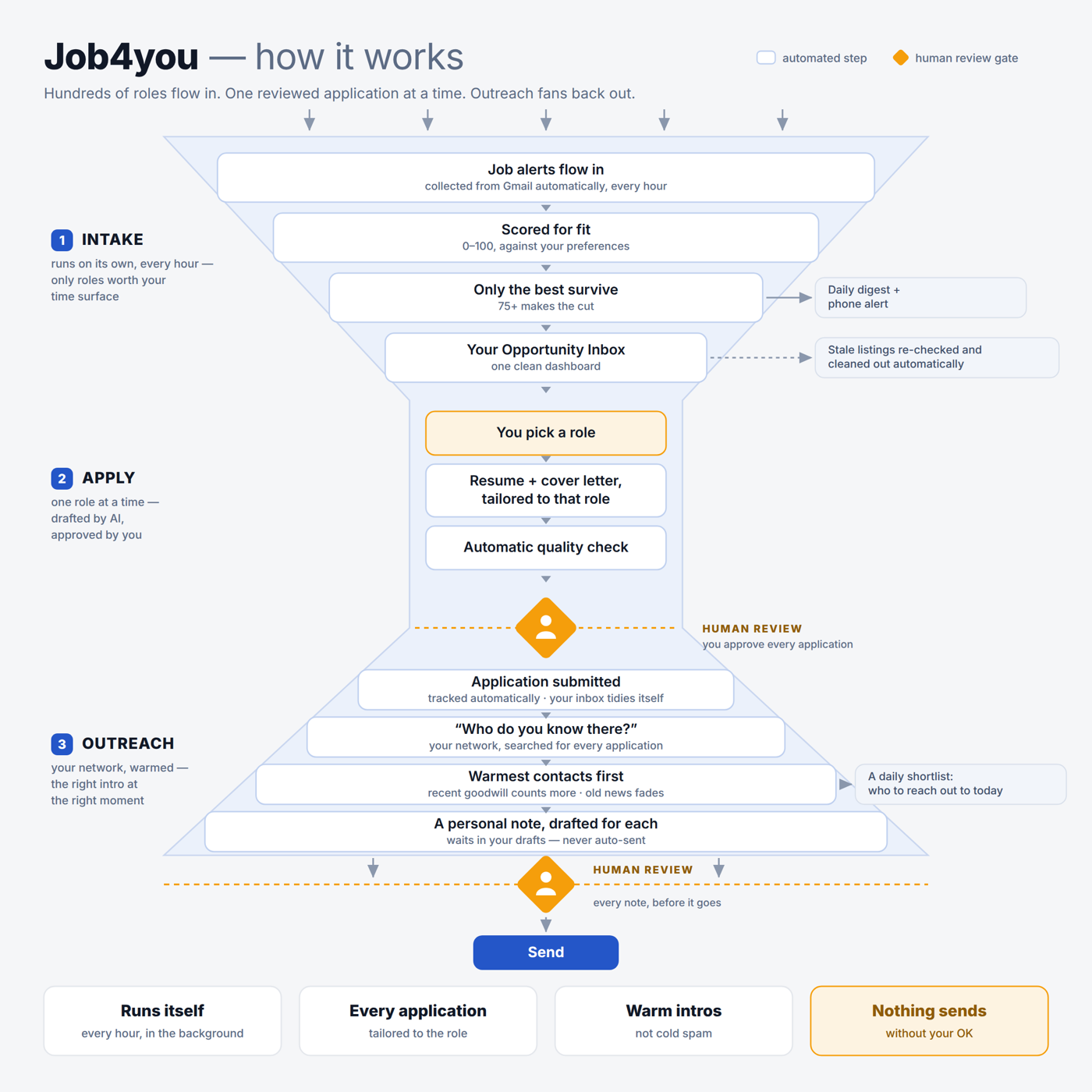
Intake runs on its own every hour. It reads alerts from every source I could route into one inbox, LinkedIn, Indeed, Jobright, Dice, Wellfound and the rest, parses each listing out of the digest, and scores it 0 to 100 against a preferences file that says what titles, keywords, and dealbreakers I care about. Anything at 75 or above lands in the dashboard, and I get a digest email and a phone push only when something new cleared the bar. A staleness sweep re-fetches any listing older than ten days and drops it if the posting is closed or no longer scores.
Apply is one role at a time. I pick it, the tool drafts a resume and cover letter tailored to that listing from my master resume, and a second pass checks the output against a set of applicant tracking system rules: no placeholders, no invented facts, dates and titles that match the source. Then I read it. When I mark it applied, it logs the application to BigQuery and a sheet and the role leaves the dashboard on its own. Getting that last part right took a real fix: for a while the logger was failing silently, so a reconcile job now checks both the ledger and my Gmail for confirmation emails before it hides anything.
Outreach is the part that was missing. For every application, the tool looks at who I already know at that company across my connections and a contacts graph I have been building since spring. Each person has a warmth score: a base for how we know each other, plus every interaction we have had, weighted and decayed. Good signals fade on a 120 day half-life, bad ones on 365, so a burned bridge outlasts a good conversation. An eligibility gate runs before anything else, per ask rather than per company, because a referral request can be off the table while a coffee chat is fine. Unknown data fails open so I see it rather than lose it. The warmest people rank first, at most two per company, and a model writes a one line hook for each. The rest of the note is a fixed template that refuses to render with an empty hook, a dollar figure, or a semicolon. Every note lands in my Gmail drafts. Nothing sends until I have read it.
The whole thing is about nineteen thousand lines of Python across sixty modules with 273 tests, built in 480 commits since late May. Streamlit for the dashboard, the Gmail API, BigQuery and Sheets for the ledgers, Gemini for the drafting, launchd for the schedule, Playwright for the couple of places a logged in browser is unavoidable.
Here is what changed. Same person, same market, same hours.
| Month | Applications | Outreach touches |
|---|---|---|
| May and June | 5 | 5 |
| July | 14 | 22 |
| August | 72 | 111 |
The touches are now mostly email, phone, and text rather than cold LinkedIn messages, which is the channel shift the audit said to make.
I do not have the new role yet. What I have is a search that runs at a volume I could not sustain by hand, with my attention spent on the people rather than the portals. I am considering opening up a cleaned-up version of the tool if there is interest.
Slumped Over Man premiered
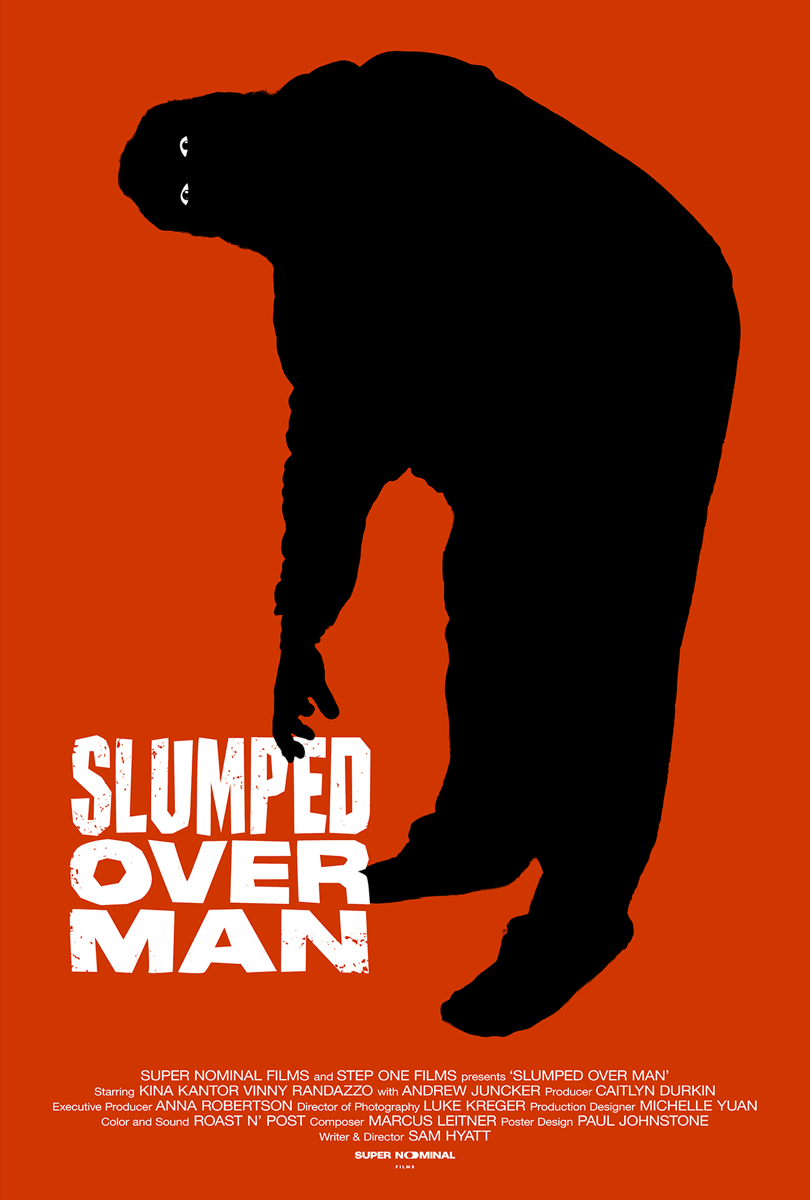
A short film I worked on premiered on Wednesday, August 19, 2026. It is called Slumped Over Man, written and directed by Sam Hyatt, and I was the production manager on it. My job was to coordinate the schedules, locations, meals, and gear for the shoot days. I also built the pre-pro book and deck for the team from the assets we had assembled, and I managed the budget and expenses.
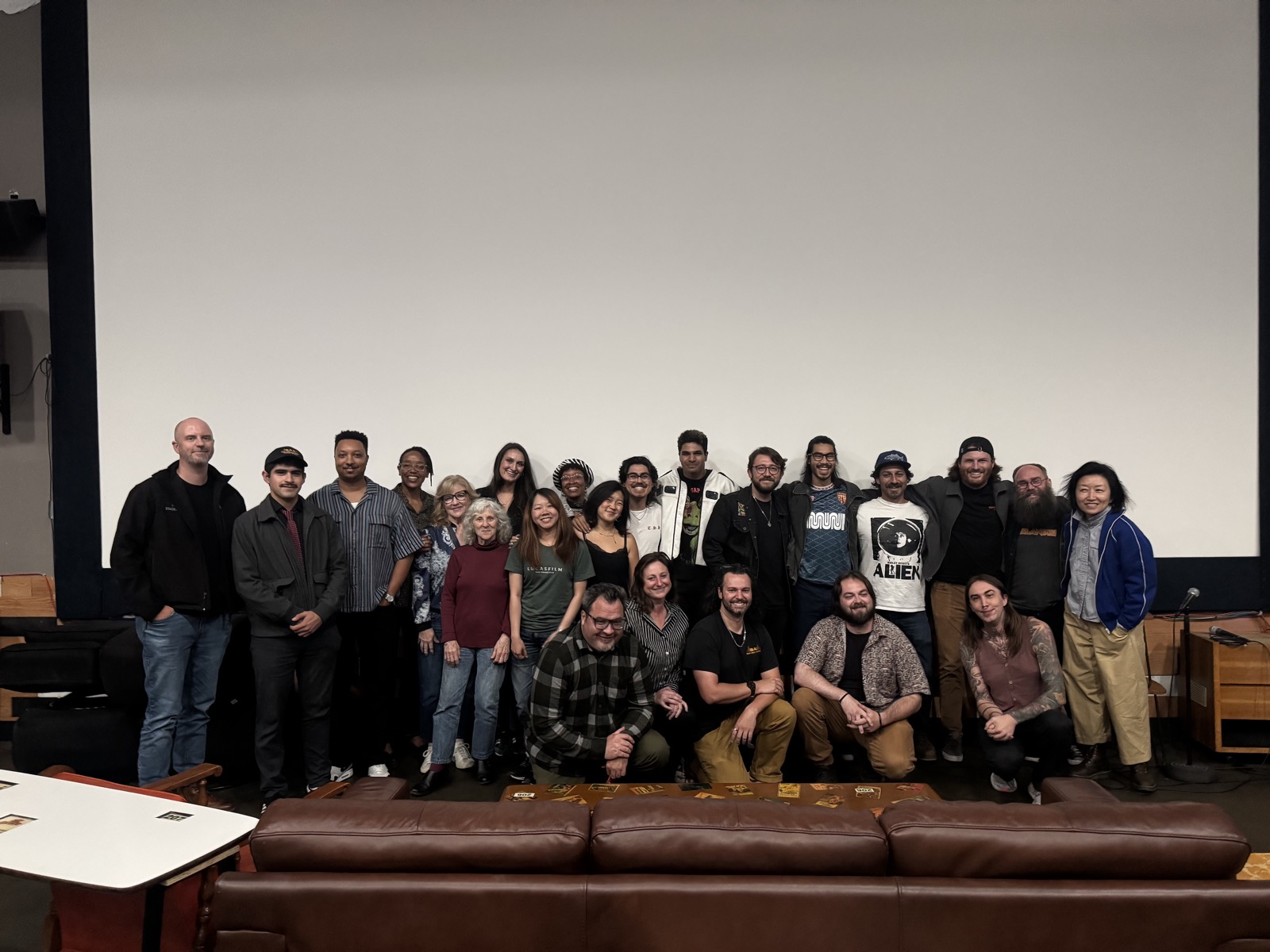
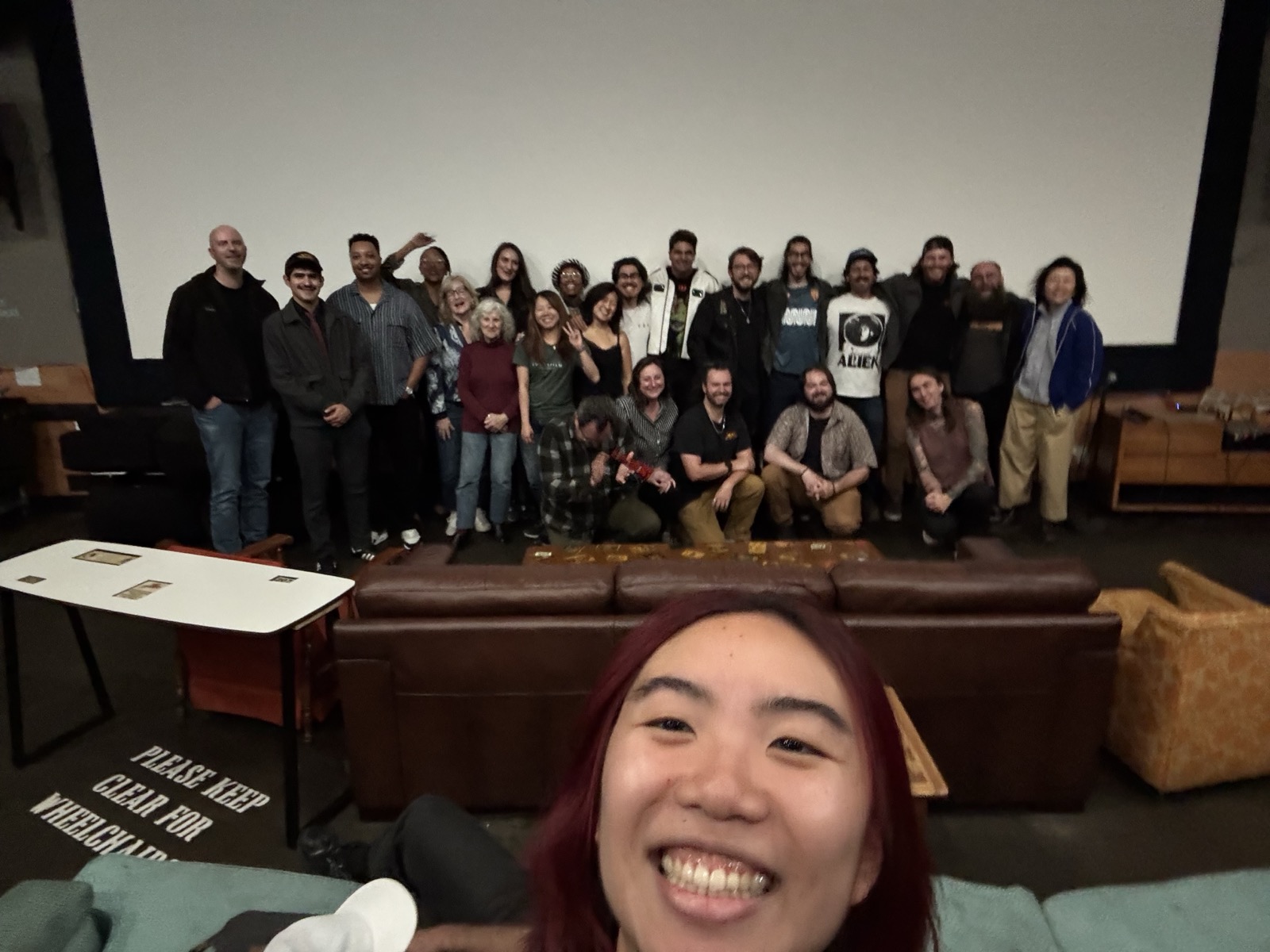
We screened it Wednesday night at The New Parkway Theater in Oakland with two other local shorts and had the after party at The Night Heron. Seeing something finished in a room full of the people who made it is a different experience than any project review I have sat through. The director is figuring out what is next for the film, so for now the only things I can share are the poster and the behind the scenes photos, which were taken by Selina Pan.
The website caught up with the work
This site got its biggest update since I built it. There is a new page called what i've done that tells the physical operations story with photos I took along the way, from the Google Express warehouses to a film set, plus a couple of images recovered from Internet Archive captures of Google's old blog posts. The resume moved on site as a real page with a hosted PDF, restyled to match the rest of the design.
The home page also got a contact strip, and deciding what belongs on it was its own small exercise. Email and LinkedIn made the cut. My phone number is on the resume, where someone reading it has a reason to call, but not on the home page.
The numbers said change the plan
I pulled the numbers on my job search to see what was actually working. Nine tailored applications through the portals had produced zero screening calls. Direct messages to real people, sent with a specific note about a specific role, were getting replies a little under half the time.
So the plan changed. Applications still happen when a role is a strong fit, but the hours now go to finding the right person, writing them a real note, and logging every touch in one place so I always know who I contacted, about what, and when a follow up is due.
A fact gate for my own resume
I rebuilt my resume pipeline on top of an open source toolchain I found, and the part I added is a fact gate. There is one source of truth file with everything I have actually done, with numbers I can stand behind. Every tailored resume I generate gets checked against that file before it renders, so no version can drift into claims I did not make.
There is also a hard two page limit that fails the build instead of quietly spilling onto a third page, and I look at every rendered PDF before it goes anywhere. Trimming to fit the gate turns out to be a better editor than I am. It forces a decision about which bullet is actually the weakest.
Checking whether Craigslist was worth wiring up
I have a job search tool that pulls listings from a few sources and scores them against my background. I wanted to add Craigslist to it, but before writing the integration I decided to find out whether there was anything on there worth pulling.
I pulled 407 postings out of the Bay Area tech and management categories and read through what came back. Almost all of it was contract IT support, hourly work, and a fair amount of spam. There were zero postings at the level I am actually looking for.
So I did not build the integration. I saved the scraping recipe in my notes in case that changes, since curl and the RSS feeds are both blocked and it needs a real browser to get anything.
An afternoon of checking saved me about a week of building something I would not have used.
The BigQuery outage that wasn't
All of my automation tools stopped working on Thursday morning. Every one of them threw the same error, saying it could not reach BigQuery.
I checked the status page first and everything was green. Then I checked my credentials, re-authenticated, and ran it again. Still broken.
It turned out the problem was Python. I had installed the gcloud CLI a few days earlier, and it brought Homebrew's Python 3.14 along with it as a dependency. That put a new python3 ahead of mine on the PATH, so all of my tools were running under an interpreter that did not have any of their packages. The BigQuery library was just the first missing thing they hit, so that is the error I saw.
The fix was one line in my .zshrc, and it took most of the afternoon to find. The error named a specific service and that service was fine the entire time. Now I check what python3 actually points at before I believe anything an error message tells me about a service being down.
Running the same research twice
I spent a while looking into whether I should build a shared knowledge layer, so that my different agents could read from one common set of facts instead of each keeping their own notes.
I ran a research pass on it and got back an answer I liked, which is usually a bad sign. When I went through the inputs again I found the run had been contaminated. I had included my own design notes in the source material, so the research was partly summarizing my own assumptions back to me.
I cleared it out and ran it again from scratch. The second answer was that I should not build this right now. The format I was planning to standardize on is about six weeks old and still at version 0.1, and there is an existing tool that already covers most of what I wanted.
So I parked it and wrote down what would need to be true for me to pick it back up. The second run also caught something I had wrong. I had assumed one of my tools loads its config file automatically and it does not, which explained a few things that had not been working the way I expected.
Getting the tool to write things down
I built a small tool that reads my contact list against job descriptions and tells me who is worth reaching out to. It worked, but I noticed I was still copying the results into a spreadsheet by hand afterward.
That hand-copying was the step that always broke. I would run the tool, get a good list, get busy, and never log any of it. A week later I would have no record of who I had already contacted or what I had asked them.
So I moved the logging into the tool. Now when I approve a contact it writes the row to the Contacts tab itself, including the notes and the follow-up date. The spreadsheet is still the thing I look at, I just stopped being the one typing into it.
Hardening a payments platform before it touches real money
I have been building a booking and payments platform for a consulting client, a farm tour operator down in the Santa Cruz mountains. They work in the cannabis space, which was new to me, so a good part of this engagement has been learning what their compliance situation actually requires before writing anything.
This past week was the security pass before it goes anywhere near live. I encrypted the personal information at rest, added rate limiting on the public endpoints, and put logging on the booking funnel so we can see where people drop off. I also ran a backup and restore drill to confirm the restore actually worked.
The one that bothered me most was in the admin two-factor setup. If someone already had 2FA turned on, the enrollment endpoint would still let them register a new secret over the top of the old one. Anyone who got into an active session could quietly swap the second factor for their own and lock the real owner out of their account. I blocked re-enrollment over an existing secret and added a test so it stays blocked.
Two Macs, one setup
I work across two Macs, an Apple Silicon laptop and an older Intel desktop. For a long time I had been treating one as the primary and the other as a copy, which meant I was always slightly unsure which one had the current version of anything.
I wrote up an architecture and a runbook for treating them as equals instead. The scheduled jobs all live on one machine so nothing runs twice, but the code, the notes, and the tooling are identical on both, and either one can pick up where the other left off. They talk to each other over Tailscale so it works from anywhere.
The part I did not expect was how much of this turned out to be documentation rather than code. Most of the actual failures came from me not being sure which machine I was on.
The cleanup system paid for itself
Back in June I built a small hygiene tool that audits my Downloads and Desktop folders and flags files by how stale they are. It is read only. It proposes things and I approve them, because I did not want something deleting files on its own.
This month was its first real run. It found 42 stale items and I archived all of them. It also flagged a couple of files that had credentials sitting in them, which it does not touch, it just tells me they are there.
It runs once a month on its own now, and it only emails me when there is actually something to look at. That last part matters more than it sounds. The version that emailed me every month no matter what is the version I would have started ignoring by October.
A ranked list that does not hide anyone
The networking tool ranks my contacts by how likely they are to be able to help with a particular role. The obvious way to build that is to show the top ten and drop everyone else.
I did not do that, because the ranking is a guess. It is built on job titles and companies from an export that is often out of date, and I have already been burned twice by acting on stale employer data. If the tool quietly hides someone, I never find out it was wrong about them.
So it ranks everyone and it shows everyone, and the ranking only changes the order. It also gives me one contact brief per run instead of a list to work through, which keeps me from opening it, feeling overwhelmed, and closing it again.
Presenting at the farm
I drove down to the client's farm and walked the owners through the proposal in person.
The first version of the deck led with the data and the tooling, which is the part I find most interesting. I rewrote it before the meeting to lead with strategy and brand and what they would actually get out of the engagement, and moved the tooling to the back as the thing that makes the rest of it work. That version landed much better.
I also demoed the booking system running against real seed data instead of showing screenshots of it. Being able to click through the thing in front of them was worth more than any slide I could have made.
They are considering it and I left the deck with them. However it goes, the rewrite was the useful part. I had been presenting my work in the order I built it rather than the order they cared about.
When a vendor turns off the free tier
Google discontinued the free tier for the Gemini CLI, and a few of my tools started failing the same morning with an error about account eligibility.
The direct API still worked, so the fix was to stop shelling out to the CLI and call the API over HTTP instead, with a retry and a flag to switch the CLI path back on if it ever returns. Then I went through the other pipelines that touch Gemini to work out which of them were affected. Most were already calling the API directly and were fine.
The useful part was having a test I could run to answer that question instead of guessing at it. I had written it earlier for an unrelated reason and it happened to be exactly what I needed.
Retiring a tool instead of maintaining two
I retired one of my agents, the one that curated job alert emails and drafted tailored application materials. The newer scanner I built covers the same ground with better data, and keeping both running meant maintaining both.
Before deleting it I went through what it did better than its replacement. Its formatting standards for application documents and its self checks were worth keeping, so those were merged into the new generator first. Then the old one came out of the repo on both machines.
The scheduler could not touch the cloud drive
My job scanner runs on a schedule, once an hour during the workday. It reads the alert emails, scores each role against my background, and sends me a digest only when something new clears the bar. When I first set it up the code lived in a cloud synced folder, and the scheduled runs kept failing silently while manual runs worked every time.
It turned out macOS blocks background jobs from executing or writing inside cloud synced folders, and the failure leaves almost no trace. That became a rule for the whole setup. Anything a scheduled job touches, the program, the logs, and the files it writes, lives on local disk. The scanner has run cleanly since.
One repo for the whole setup
This spring I started running my job search and consulting work through command line AI agents, after finishing the film production degree and a round of AI fundamentals coursework. By late May there was enough tooling that it had outgrown the loose folders it started in, so I moved all of it into one private git repository that both of my machines share.
Code and agent definitions live in the repo. Keys and personal data do not, and setting up that split was a good forcing function to rotate the credentials that had been sitting around in plain text. There is an install script that sets up a fresh machine and a doctor script that reports whether the two machines have drifted apart. This log picks up from there.